

How To Create A Registration Form In Python
Registration Form In Python Using Tkinter With Source Code
The Registration Form In Python Using Tkinter is designed in Python programming language and MySQL Database. In this tutorial I will teach you on How To Create A Registration Form In Python. and also I will teach you in Designing (GUI) or Graphical User Interface on How To Make Registration Form In Python Using Tkinter.
Tkinter is a python library for developing GUI (Graphical User Interfaces). We use the tkinter library for creating an application of UI (User Interface), to create windows and all other graphical user interfaces.
Watch the Video here to see the full running of this Python project using Tkinter.
A Registration Form In Python also includes the downloadable User Registration Form In Python Source Code for Free.
To start creating Registration Form In Python Using Tkinter, make sure that you have Pycharm IDE installed in your computer.
By the way if you are new to python programming and you don't know what would be the the Python IDE to use, I have here a list of Best Python IDE for Windows, Linux, Mac OS that will suit for you. I also have here How to Download and Install Latest Version of Python on Windows.
Steps on how to create Registration Form In Python Using Tkinter With Source Code
Registration Form In Python Using Tkinter With Source Code
- Step 1: Create a project name.
First open Pycharm IDE and then create a "project name" after creating a project name click the "create" button.
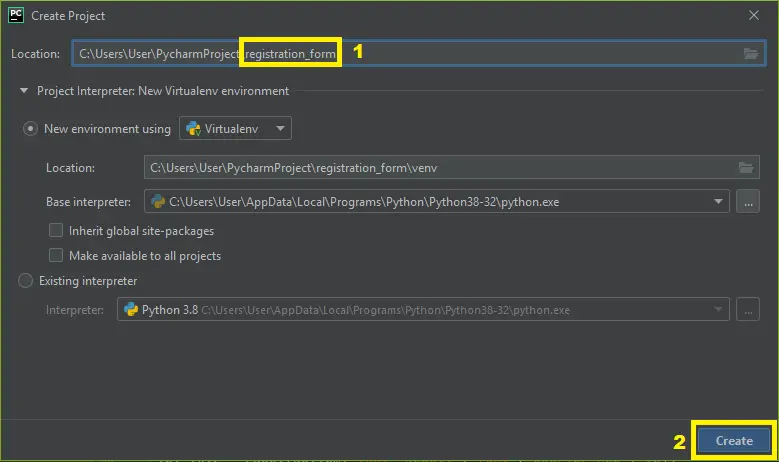
- Step 2: Create a python file.
Second after creating a project name, "right click" your project name and then click "new" after that click the "python file".
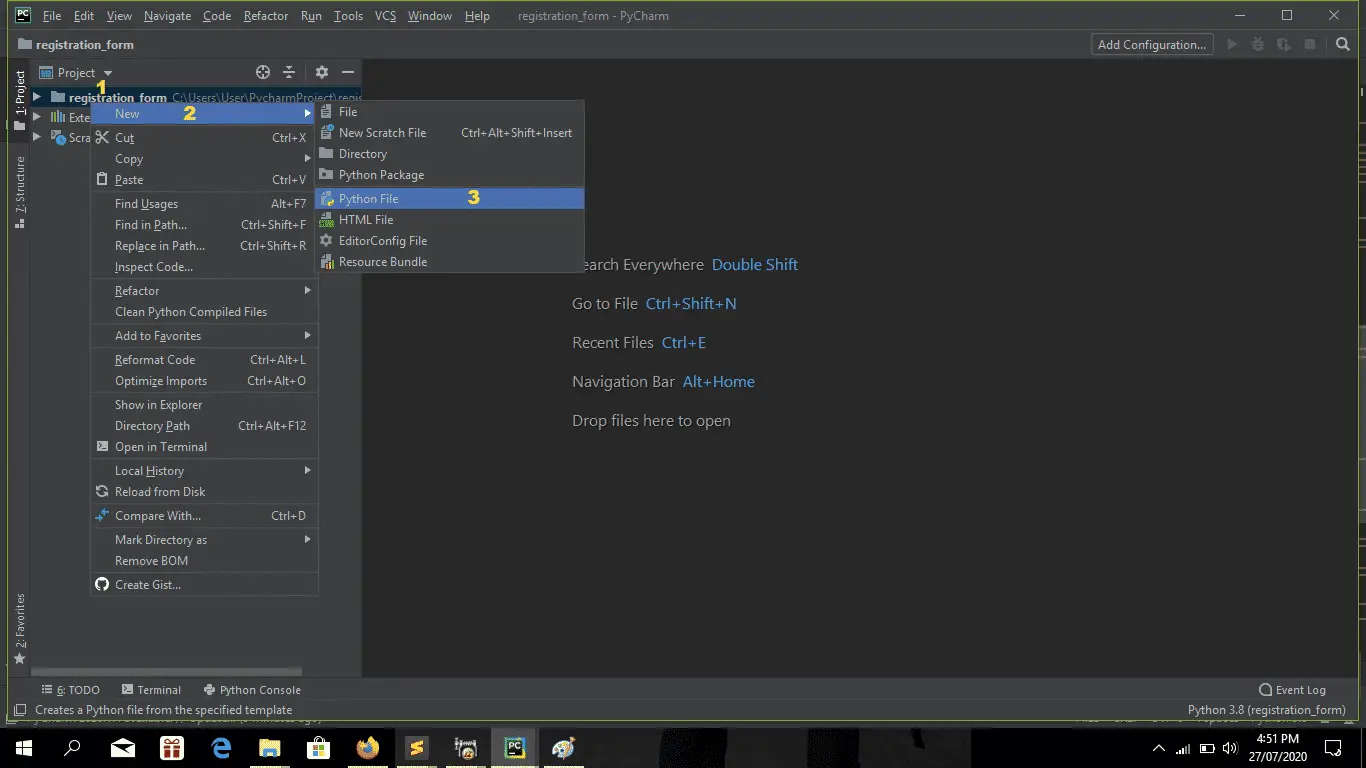
- Step 3: Name your python file.
Third after creating a python file, Name your python file after that click "enter".
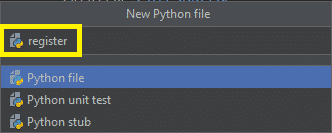
- Step 4: The actual code.
You are free to copy the code given below and download the full source code below.
Creating Database And Table
So first, create a database then name it as any name you desire. In my case, I use the "registerdb" as the name of the database.
Then create a table, name it as "user". Then put the following attributes.
The Code Given Below Is for Creating Table "user".
| CREATE TABLE ` user ` ( ` id ` int ( 11 ) NOT NULL , ` user ` varchar ( 30 ) NOT NULL , ` pass ` text NOT NULL , ` name ` varchar ( 30 ) NOT NULL , ` address ` text NOT NULL ) ENGINE=InnoDB DEFAULT CHARSET=latin1 ; |
In this module which is creating the table user.
The Code Given Below Is For Importing Modules.
| from tkinter import * import tkinter . messagebox as tkMessageBox import mysql . connector from mysql . connector import Error |
In this codes which is importing all module.
The Code Given Below Is For The Variables.
| USER = StringVar ( ) PASS = StringVar ( ) NAME = StringVar ( ) ADDRESS = StringVar ( ) |
The code given is for declaring all the variable that being use to call.
The Code Given Below Is For Methods.
| 1 2 3 4 5 6 7 8 9 10 11 12 13 14 15 16 17 18 19 20 21 22 23 24 25 26 27 28 29 30 31 32 33 34 | def Database ( ) : global conn , cursor conn = mysql . connector . connect ( host='localhost' , database='registerdb' , user='root' , password='' ) cursor = conn . cursor ( ) def Exit ( ) : result = tkMessageBox . askquestion ( 'System' , 'Are you sure you want to exit?' , icon="warning" ) if result == 'yes' : root . destroy ( ) exit ( ) def Register ( ) : Database ( ) if USER . get == "" or PASS . get ( ) == "" or NAME . get ( ) == "" or ADDRESS . get == "" : lbl_result . config ( text="Please complete the required field!" , fg="orange" ) else : cursor . execute ( "SELECT * FROM `user` WHERE `user` = %s" , [ USER . get ( ) ] ) if cursor . fetchone ( ) is not None : lbl_result . config ( text="Username is already taken" , fg="red" ) else : cursor . execute ( "INSERT INTO `user` (user, pass, name, address) VALUES(%s, %s, %s, %s)" , ( str ( USER . get ( ) ) , str ( PASS . get ( ) ) , str ( NAME . get ( ) ) , str ( ADDRESS . get ( ) ) ) ) conn . commit ( ) USER . set ( "" ) PASS . set ( "" ) NAME . set ( "" ) ADDRESS . set ( "" ) lbl_result . config ( text="Successfully Created!" , fg="green" ) cursor . close ( ) conn . close ( ) |
The code given which declaring all the methods that being call and execute.
The Code Given Below Is For The GUI.
| 1 2 3 4 5 6 7 8 9 10 11 12 13 14 15 16 17 18 19 20 21 22 23 24 25 26 27 28 29 30 31 32 33 34 35 36 37 38 39 | TitleFrame = Frame ( root , height=100 , width=640 , bd=1 , relief=SOLID ) TitleFrame . pack ( side=TOP ) RegisterFrame = Frame ( root ) RegisterFrame . pack ( side=TOP , pady=20 ) #=====================================LABEL WIDGETS============================= lbl_title = Label ( TitleFrame , text="IT SOURCECODE - Register Form" , font=( 'arial' , 18 ) , bd=1 , width=640 ) lbl_title . pack ( ) lbl_username = Label ( RegisterFrame , text="Username:" , font=( 'arial' , 18 ) , bd=18 ) lbl_username . grid ( row=1 ) lbl_password = Label ( RegisterFrame , text="Password:" , font=( 'arial' , 18 ) , bd=18 ) lbl_password . grid ( row=2 ) lbl_firstname = Label ( RegisterFrame , text="Name:" , font=( 'arial' , 18 ) , bd=18 ) lbl_firstname . grid ( row=3 ) lbl_lastname = Label ( RegisterFrame , text="Address:" , font=( 'arial' , 18 ) , bd=18 ) lbl_lastname . grid ( row=4 ) lbl_result = Label ( RegisterFrame , text="" , font=( 'arial' , 18 ) ) lbl_result . grid ( row=5 , columnspan=2 ) #=======================================ENTRY WIDGETS=========================== user = Entry ( RegisterFrame , font=( 'arial' , 20 ) , textvariable=USER , width=15 ) user . grid ( row=1 , column=1 ) pass1 = Entry ( RegisterFrame , font=( 'arial' , 20 ) , textvariable=PASS , width=15 , show="*" ) pass1 . grid ( row=2 , column=1 ) name = Entry ( RegisterFrame , font=( 'arial' , 20 ) , textvariable=NAME , width=15 ) name . grid ( row=3 , column=1 ) address = Entry ( RegisterFrame , font=( 'arial' , 20 ) , textvariable=ADDRESS , width=15 ) address . grid ( row=4 , column=1 ) #========================================BUTTON WIDGETS========================= btn_register=Button ( RegisterFrame , font=( 'arial' , 20 ) , text="Register" , command=Register ) btn_register . grid ( row=6 , columnspan=2 ) #========================================MENUBAR WIDGETS================================== menubar = Menu ( root ) filemenu = Menu ( menubar , tearoff=0 ) filemenu . add_command ( label="Exit" , command=Exit ) menubar . add_cascade ( label="File" , menu=filemenu ) root . config ( menu=menubar ) |
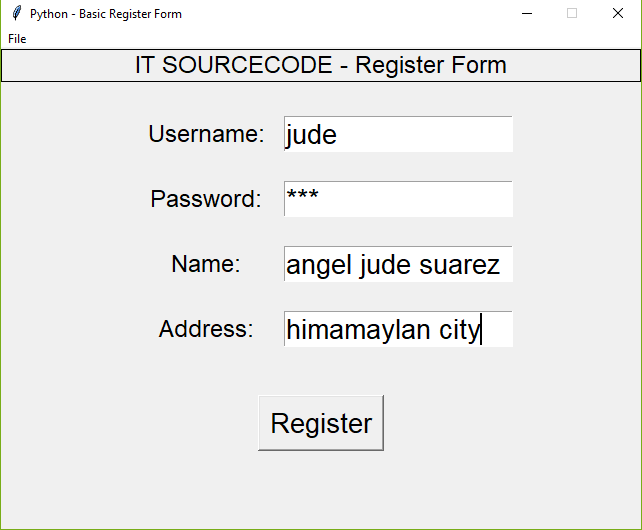
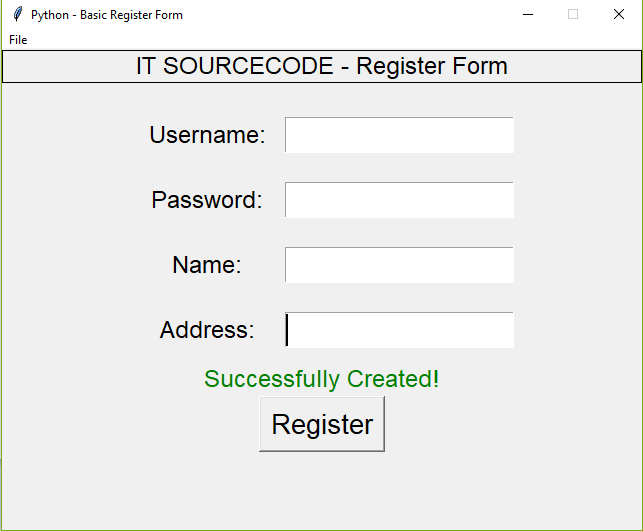
The code given is the GUI or Graphical User Interface of Registration Form.
Complete Source Code
| 1 2 3 4 5 6 7 8 9 10 11 12 13 14 15 16 17 18 19 20 21 22 23 24 25 26 27 28 29 30 31 32 33 34 35 36 37 38 39 40 41 42 43 44 45 46 47 48 49 50 51 52 53 54 55 56 57 58 59 60 61 62 63 64 65 66 67 68 69 70 71 72 73 74 75 76 77 78 79 80 81 82 83 84 85 86 87 88 89 90 91 92 93 94 95 96 97 98 99 100 101 102 103 104 105 106 107 | from tkinter import * import tkinter . messagebox as tkMessageBox import mysql . connector from mysql . connector import Error root = Tk ( ) root . title ( "Python - Basic Register Form" ) width = 640 height = 480 screen_width = root . winfo_screenwidth ( ) screen_height = root . winfo_screenheight ( ) x = ( screen_width/2 ) - ( width/2 ) y = ( screen_height/2 ) - ( height/2 ) root . geometry ( "%dx%d+%d+%d" % ( width , height , x , y ) ) root . resizable ( 0 , 0 ) #=======================================VARIABLES===================================== USER = StringVar ( ) PASS = StringVar ( ) NAME = StringVar ( ) ADDRESS = StringVar ( ) #=======================================METHODS======================================= def Database ( ) : global conn , cursor conn = mysql . connector . connect ( host='localhost' , database='registerdb' , user='root' , password='' ) cursor = conn . cursor ( ) def Exit ( ) : result = tkMessageBox . askquestion ( 'System' , 'Are you sure you want to exit?' , icon="warning" ) if result == 'yes' : root . destroy ( ) exit ( ) def Register ( ) : Database ( ) if USER . get == "" or PASS . get ( ) == "" or NAME . get ( ) == "" or ADDRESS . get == "" : lbl_result . config ( text="Please complete the required field!" , fg="orange" ) else : cursor . execute ( "SELECT * FROM `user` WHERE `user` = %s" , [ USER . get ( ) ] ) if cursor . fetchone ( ) is not None : lbl_result . config ( text="Username is already taken" , fg="red" ) else : cursor . execute ( "INSERT INTO `user` (user, pass, name, address) VALUES(%s, %s, %s, %s)" , ( str ( USER . get ( ) ) , str ( PASS . get ( ) ) , str ( NAME . get ( ) ) , str ( ADDRESS . get ( ) ) ) ) conn . commit ( ) USER . set ( "" ) PASS . set ( "" ) NAME . set ( "" ) ADDRESS . set ( "" ) lbl_result . config ( text="Successfully Created!" , fg="green" ) cursor . close ( ) conn . close ( ) #=====================================FRAMES==================================== TitleFrame = Frame ( root , height=100 , width=640 , bd=1 , relief=SOLID ) TitleFrame . pack ( side=TOP ) RegisterFrame = Frame ( root ) RegisterFrame . pack ( side=TOP , pady=20 ) #=====================================LABEL WIDGETS============================= lbl_title = Label ( TitleFrame , text="IT SOURCECODE - Register Form" , font=( 'arial' , 18 ) , bd=1 , width=640 ) lbl_title . pack ( ) lbl_username = Label ( RegisterFrame , text="Username:" , font=( 'arial' , 18 ) , bd=18 ) lbl_username . grid ( row=1 ) lbl_password = Label ( RegisterFrame , text="Password:" , font=( 'arial' , 18 ) , bd=18 ) lbl_password . grid ( row=2 ) lbl_firstname = Label ( RegisterFrame , text="Name:" , font=( 'arial' , 18 ) , bd=18 ) lbl_firstname . grid ( row=3 ) lbl_lastname = Label ( RegisterFrame , text="Address:" , font=( 'arial' , 18 ) , bd=18 ) lbl_lastname . grid ( row=4 ) lbl_result = Label ( RegisterFrame , text="" , font=( 'arial' , 18 ) ) lbl_result . grid ( row=5 , columnspan=2 ) #=======================================ENTRY WIDGETS=========================== user = Entry ( RegisterFrame , font=( 'arial' , 20 ) , textvariable=USER , width=15 ) user . grid ( row=1 , column=1 ) pass1 = Entry ( RegisterFrame , font=( 'arial' , 20 ) , textvariable=PASS , width=15 , show="*" ) pass1 . grid ( row=2 , column=1 ) name = Entry ( RegisterFrame , font=( 'arial' , 20 ) , textvariable=NAME , width=15 ) name . grid ( row=3 , column=1 ) address = Entry ( RegisterFrame , font=( 'arial' , 20 ) , textvariable=ADDRESS , width=15 ) address . grid ( row=4 , column=1 ) #========================================BUTTON WIDGETS========================= btn_register=Button ( RegisterFrame , font=( 'arial' , 20 ) , text="Register" , command=Register ) btn_register . grid ( row=6 , columnspan=2 ) #========================================MENUBAR WIDGETS================================== menubar = Menu ( root ) filemenu = Menu ( menubar , tearoff=0 ) filemenu . add_command ( label="Exit" , command=Exit ) menubar . add_cascade ( label="File" , menu=filemenu ) root . config ( menu=menubar ) #========================================INITIALIZATION=================================== if __name__ == '__main__' : root . mainloop ( ) |
Output
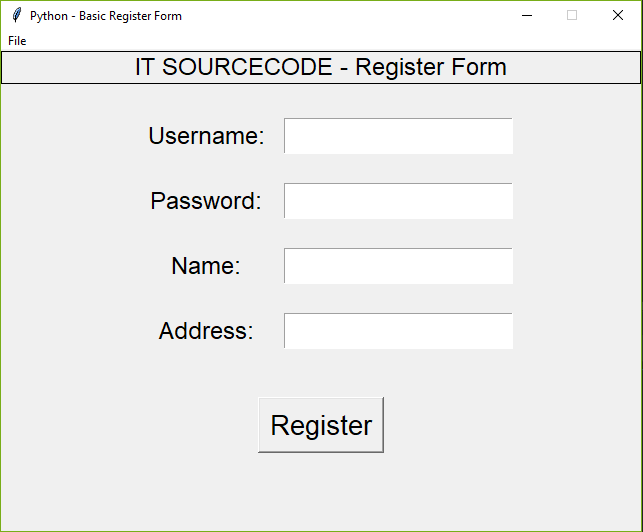
Registration Form In Python : Project Information
| Project Name: | Registration Form In Python |
| Language/s Used: | Python (GUI) Based |
| Python version (Recommended): | 2.x or 3.x |
| Database: | None |
| Type: | Python App |
| Developer: | IT SOURCECODE |
| Updates: | 0 |
Run Quick Virus Scan for secure Download
Run Quick Scan for secure Download
Downloadable Source Code
I have here the list of Best Python Project with Source code free to download for free, I hope this can help you a lot.
Summary
The Registration Form In Python Using Tkinter, Tkinter is a python library for developing GUI (Graphical User Interfaces). We use the tkinter library for creating an application of UI (User Interface), to create windows and all other graphical user interfaces.
This Registration Form In Python is designed in Python programming language and MySQL Database. Python is very smooth to research the syntax emphasizes readability and it is able to reduces time ingesting in developing
Related Articles
- Python MySQL UPDATE Query: Step-by-Step Guide in Python
- Bank Management System Project in Python With Source Code
- Python MySQL INSERT Query: Step by Step Guide in Python
- How To Make Game In Python With Source Code
- Complaint Management System Source Code In PHP
Inquiries
If you have any questions or suggestions aboutRegistration Form In Python Using Tkinter , please feel free to leave a comment below.
How To Create A Registration Form In Python
Source: https://itsourcecode.com/free-projects/python-projects/registration-form-in-python-using-tkinter-with-source-code/
Posted by: baileydoopeas.blogspot.com
0 Response to "How To Create A Registration Form In Python"
Post a Comment